
Best eSIM for Japan in 2026: Airalo vs Ubigi vs Klook
Disclosure: This article contains affiliate links. If you buy through them, we may earn a small commission at no extra cost to you. We only recommend services we believe are genuinely useful for travelers to Japan.
In a hurry? The short answer:
- City trip or first eSIM: Airalo — a simple app, with Japan plans from about $4 on SoftBank plus one other network
- Want two networks and data sharing: Ubigi — its Japan plans list NTT Docomo and KDDI, from US$14 for 10GB / 7 days
- Also booking tours and tickets: Klook — its Japan eSIM (SoftBank / Docomo) sits in the same app
- Our take: for the standard Tokyo–Kyoto–Osaka route, any of the three is a reasonable choice — compare the current price for your exact trip length before you buy
Landing in Japan without mobile data is one of the most stressful ways to start a trip. No maps, no translation apps, no train times, no way to call your hotel. For most travelers in 2026, the cleanest solution is an eSIM — a digital SIM you install before you fly and switch on the moment your plane touches down.
But which is the best eSIM for Japan for your trip? Three popular options are Airalo, Ubigi, and Klook. They look similar at first glance, but they differ in ways that matter — the networks they use, price, and plan options. This guide compares all three so you can pick the right one before you go.
Why you need an eSIM for Japan
Japan is famously easy to travel and famously hard to navigate without data. Free public Wi-Fi exists but is patchy, slow, and often requires clunky sign-ups. Renting a pocket Wi-Fi device means picking it up (at the airport, your hotel or home), carrying an extra gadget, and returning it before you leave.
An eSIM removes all of that. You buy it online, install it in a couple of minutes, and on some plans (such as Ubigi’s) the plan starts automatically when you arrive. There’s no physical SIM to swap, nothing to return, and you keep your regular number active for calls and messages. Being online from the start matters most on a first visit, when you’ll want maps and train times as soon as you leave the arrivals hall.
The catch is that Japan eSIMs differ in a few ways. Providers use different local networks, price their plans differently, and offer different extras — which is exactly what the comparison below is about.
Airalo vs Ubigi vs Klook: quick comparison
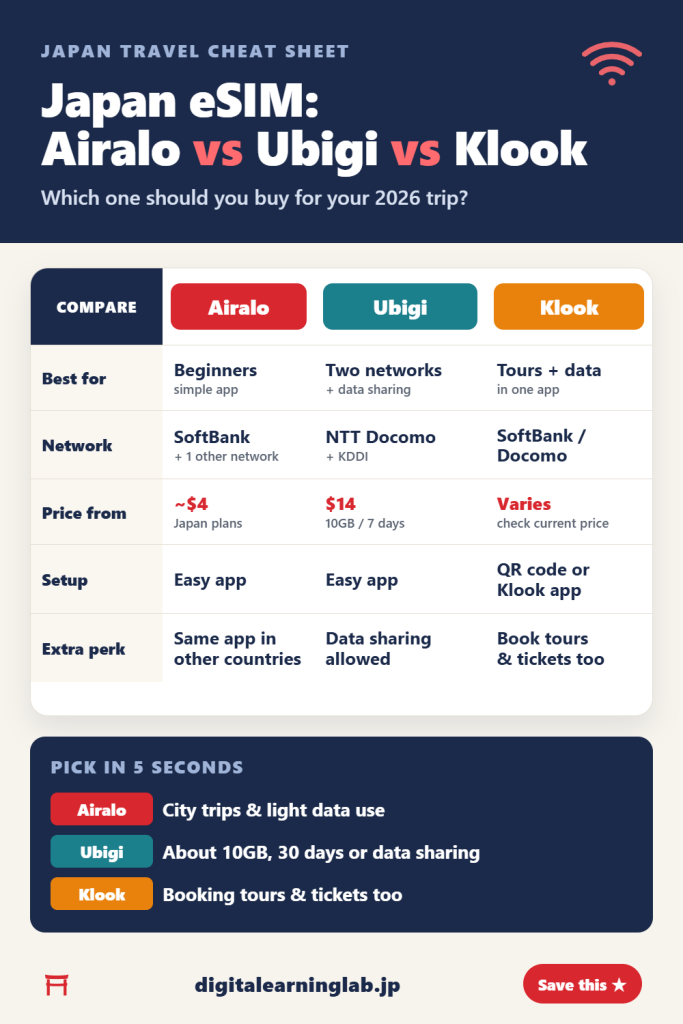
| Airalo | Ubigi | Klook | |
|---|---|---|---|
| Best for | Beginners & simplicity | Two networks & a low-cost 30-day plan | Booking tours & data together |
| Network | SoftBank + 1 other network | NTT Docomo & KDDI | SoftBank / Docomo |
| Starting price | From around $4 | US$14 (10GB / 7 days) | Varies — check the current price |
| Setup speed | Easy app | Easy app | QR code or Klook app |
| Extra perk | Same app in other countries | Data sharing allowed | Book tours & tickets too |
Prices and plans change often — always check the current rate on each provider’s page before buying.
Airalo — best for first-timers who want simplicity
Airalo is a well-known travel eSIM brand. Its app is clean and beginner-friendly, plans start from just a few dollars, and buying and installing takes only a couple of minutes. If you’ve never used an eSIM before and want the lowest-stress option, Airalo is the safe default.
Airalo’s Japan plans start from around $4, and it offers unlimited plans from 3 to 30 days for heavier users. Its Japan plans list SoftBank as the main network plus one other, so in cities like Tokyo, Osaka, and Kyoto you’re on a major Japanese carrier for maps, translation, and social media.
If your itinerary includes deep countryside — rural Hokkaido, the Japanese Alps, small mountain towns — check the coverage of the listed networks for those areas before you buy. That advice applies to every eSIM on this list.
Choose Airalo if: it’s your first eSIM, you’re sticking mainly to major cities, and you value a trusted brand and dead-simple setup.
Ubigi — two networks and a low-cost 30-day plan
Ubigi’s Japan plans list two networks: NTT Docomo and KDDI. Its plan pages also say data sharing is allowed, and with its Smartstart feature the plan starts when you arrive in Japan rather than when you install it.
Plans are straightforward: 10GB for 7 days is US$14, 10GB for 30 days is US$16.50, and an unlimited 15-day plan is US$39 (full speed for the first 30GB, then 2 Mbps). The 30-day option is useful if you’re staying longer than a week or two.
Price comparisons change often. Ubigi’s own page lists its 10GB / 7-day plan at US$14 against US$17 at Airalo, but Airalo’s cheapest Japan plan starts from about $4. Compare the plan size you actually need.
Choose Ubigi if: you want a plan that lists both NTT Docomo and KDDI, you want 10GB for 30 days (US$16.50), or you want to share data with a laptop or tablet.
Klook — eSIM plus tours in one app
Klook is best known as a travel booking platform, and it also sells a Japan eSIM. You install it with a QR code or through the Klook app before you fly, so you can be online as soon as you land.
Klook’s Japan eSIM is listed as running on SoftBank 5G and Docomo. Its real advantage is the ecosystem around it: because Klook also sells tours, attraction tickets, and airport transfers, you can handle your data and the rest of your trip in one place. Booking a Skyliner ticket or a food tour right after your eSIM is convenient.
Klook’s prices vary by plan and change often, so compare the current price for your exact trip length against Airalo and Ubigi before you buy.
Choose Klook if: you’re taking a city trip, you’re already booking tours or tickets on Klook, and you like having your data in the same app.
Airalo vs Ubigi for Japan: head-to-head
If you’re torn between Airalo and Ubigi, here’s a direct comparison. Both are solid eSIMs — the right choice depends on the plan size you need, how long you’re staying, and how much you want to spend.
| Airalo | Ubigi | |
|---|---|---|
| Network in Japan | SoftBank + 1 other network | NTT Docomo & KDDI |
| Plan lengths | Unlimited: 3 to 30 days | 10GB: 7 or 30 days; unlimited: 15 days |
| Plan start | Check the plan details | Starts on arrival (Smartstart) |
| Data sharing | Check the plan details | Allowed |
| Starting price | From around $4 (small plans) | US$14 (10GB / 7 days) |
| App & setup | Very beginner-friendly | Easy |
| Extras | Same app in other countries | Unlimited plan: 30GB at full speed, then 2 Mbps |
| Best for | First-timers, city trips, light data users | About 10GB, data sharing, two-network plans |
Plans and prices change often — check each provider’s current Japan plans before buying. Always confirm hotspot support on the specific plan you choose.
Where Airalo wins
Airalo has the lower entry price of the two (Japan plans from about $4), a beginner-friendly app, and unlimited plans from 3 to 30 days. For a short city trip with light data use, a small Airalo plan keeps the cost down — there’s no need to pay for more data than you’ll use.
Where Ubigi wins
Ubigi’s Japan plans list both NTT Docomo and KDDI, and its plan pages say data sharing is allowed. Its 10GB / 7-day plan is US$14 (Ubigi’s own page lists Airalo at US$17 for comparison), and 10GB for 30 days is US$16.50. If you need around 10GB or want to share data with a laptop, Ubigi is worth pricing out.
Airalo or Ubigi? Our verdict
- City-only trip, first eSIM, or only light data use: choose Airalo. It has the lower entry price and a simple app.
- About 10GB, a month-long stay on a budget, or sharing data with a laptop: choose Ubigi. Its plans list NTT Docomo and KDDI, and data sharing is allowed.
- Heading into remote areas: either can work — check the coverage of the listed networks for the places you’re visiting before you buy.
- Long stay or heavy data: compare the current large and unlimited-style plans from both — the better deal changes over time.
What matters more than the brand is buying roughly the right amount of data, so match the plan to your trip length and how much data you use.
Check Airalo Japan plans → Check Ubigi Japan plans →
Airalo vs Klook eSIM for Japan: head-to-head
Airalo and Klook are both common picks for city-focused trips. Both list SoftBank as a network in Japan; the real differences are price for your trip length, how you like to buy, and what else you want from the app.
Deciding between just these two? Our Airalo vs Klook eSIM comparison goes deeper, comparing networks, trip lengths, speed limits on unlimited plans and hotspot support side by side.
| Airalo | Klook eSIM | |
|---|---|---|
| What it is | A dedicated travel eSIM brand | An eSIM sold via a travel booking platform |
| Network in Japan | SoftBank + 1 other network | SoftBank 5G / Docomo |
| How you install | Airalo app | QR code or Klook app |
| Starting price | From about $4 | Varies by plan — check the current price |
| Plan range | Unlimited plans for 3 to 30 days, plus fixed-data plans | Unlimited plans (check the current range) |
| App experience | Purpose-built for eSIMs; very beginner-friendly | eSIM sits alongside tours, tickets & transfers |
| Extra benefit | Reuse the same app in other countries | Book your data and the rest of your trip together |
| Best for | Frequent travelers, long stays, eSIM beginners | City trips, tour and ticket bookers |
Prices shift frequently — compare the current price for your exact trip length before deciding.
Where Airalo wins over Klook
Airalo is a dedicated eSIM company, and it shows. The app is purpose-built, and its Japan range includes unlimited plans from 3 to 30 days — including options that suit stays longer than a couple of weeks. If you travel internationally often, there’s real value in keeping one eSIM app you already know and can reuse in your next destination.
Where Klook wins over Airalo
Klook’s advantage is everything around the eSIM. Because Klook also sells tours, attraction tickets, and airport transfers, you can sort your data and your itinerary in the same place. If you were already going to book a Skyliner ticket or a food tour, bundling it all into one app is convenient. Prices vary by plan, so compare the current price for your trip length.
Airalo or Klook? Our verdict
- 7–15 day city trip, want the lowest price: price out both for your exact dates — which one is cheaper changes over time.
- Very short trip, or a long stay with heavy data use: Airalo — its unlimited plans run from 3 to 30 days.
- Already booking tours and tickets: Klook — one app, one account, one checkout.
- Frequent international traveler: Airalo — you’ll reuse the app on your next trip.
- Going deep into rural Japan: check the coverage of each plan’s listed networks for the places you’re visiting — Ubigi (NTT Docomo and KDDI) is worth comparing too.
For city travel, both are solid and you won’t regret either. The practical move is simple: price out your exact trip length on both, and take whichever is cheaper that week. The difference in day-to-day experience is small; the difference in price sometimes isn’t.
Check Airalo Japan plans → Check Klook Japan eSIM →
So which is the best eSIM for Japan?
Here’s the simplest way to decide, based on the kind of trip you’re taking:
- First trip, mostly cities? Go with Airalo — simple setup, with Japan plans from about $4.
- Need about 10GB, a low-cost 30-day plan, or data sharing? Go with Ubigi — its plans list NTT Docomo and KDDI.
- Booking tours and tickets anyway? Go with Klook — your eSIM, tours and tickets in one app.
Still unsure? For most travelers on a standard one-to-two-week trip through Japan’s major cities, you can’t go wrong with any of the three. Pick Airalo for simplicity, Klook for one-app convenience, or Ubigi for two-network plans and data sharing.
How much data do you actually need in Japan?
One of the most common questions travelers ask is how much data to buy. Overbuy and you waste money; underbuy and you’re rationing maps on day three. Here’s a rough guide — actual use depends on your phone and apps.
- Light user (1–2GB total): You mostly use Wi-Fi at your hotel and only need maps, messaging, and occasional lookups when you’re out. Fine for a short trip if you’re careful.
- Average user (500MB–1GB per day): Maps all day, translation apps, social media, photos to the cloud, and some browsing. At that rate, a week uses roughly 3.5–7GB, so a 10GB plan leaves some room.
- Heavy user (1.5GB+ per day): Streaming music or video, video calls home, hotspot for a laptop, or uploading lots of content. Consider an unlimited-style plan so you never think about it.
A practical tip: if you’ll have Wi-Fi at your hotel, you’ll often use less mobile data than you expect. If you’re unsure, a mid-size plan is a sensible choice — and check whether your plan lets you add more data if you run low.
Common eSIM mistakes to avoid
A few small errors trip up first-time eSIM users. Here’s what to watch for:
- Installing at the airport in Japan. Install before you leave home, while you have Wi-Fi. The eSIM needs an internet connection to download, so do it before you lose Wi-Fi.
- Forgetting to enable data roaming on the eSIM line. This is a common reason people think their eSIM “doesn’t work” — it’s just a toggle in settings.
- Deleting the eSIM by accident. If you remove it, you may need to contact the provider to get it back, so leave it in place until your trip ends.
- Assuming your phone is unlocked. A carrier-locked phone may reject an eSIM. On an iPhone, go to Settings > General > About: next to Carrier Lock it should say “No SIM Restrictions”. Otherwise, check with your home provider before you buy.
How to set up your eSIM (5 minutes)
The process is almost identical across all three providers:
- Check compatibility. Make sure your phone supports eSIM (iPhone XS, XS Max, XR and later; on Android, check your phone maker’s eSIM support) and is carrier-unlocked.
- Buy your plan online before you fly, using the links above.
- Install the eSIM by scanning the QR code or tapping the in-app install button. Do this at home with Wi-Fi.
- Check when your plan starts. Some plans, such as Ubigi’s, start automatically when you arrive in Japan — so you’re online the moment you land.
- Turn on data roaming for the eSIM line in your phone settings when you arrive, and you’re connected.
That’s it. No device to pick up, no physical SIM, no returning a device.
Frequently asked questions
Can I use an eSIM and keep my normal phone number?
Yes. On supported phones, a travel eSIM can run alongside your home SIM or eSIM, so you keep your regular number for calls and texts while using the eSIM for data in Japan.
When should I install the eSIM?
Install it before you fly, while you still have Wi-Fi at home. Installation and activation are separate steps — on some plans, such as Ubigi’s, the plan only starts once you arrive in Japan. Check your plan’s details.
Which has the best coverage in rural Japan?
It depends on the network. Ubigi’s plans list NTT Docomo and KDDI, Airalo’s list SoftBank plus one other, and Klook’s list SoftBank and Docomo. Before a rural trip, check the coverage for the areas you’re visiting.
Airalo or Ubigi for Japan — which should I choose?
For a short city trip (Tokyo, Osaka, Kyoto), Airalo has the lower entry price, from about $4. Ubigi lists NTT Docomo and KDDI, offers 10GB for 7 days at US$14 or for 30 days at US$16.50, and allows data sharing. If you need only a little data, start with Airalo; if you need around 10GB or a longer plan, compare Ubigi.
Airalo or Klook eSIM for Japan — which is better?
Klook lets you book your eSIM, tours and tickets in the same app. Airalo offers unlimited plans from 3 to 30 days and a purpose-built app you can reuse in other countries. Both list SoftBank as a network in Japan — compare the current price for your exact trip length and take the better deal.
Is an eSIM cheaper than pocket Wi-Fi?
It depends on your group and your dates. For one person, an eSIM means no device to pick up, carry or return; pocket Wi-Fi can make sense for families sharing one device. Compare the current prices for your trip. For a side-by-side look at setup, devices, battery and returns, see our eSIM vs pocket WiFi guide.
Will my phone work with a Japanese eSIM?
If your phone supports eSIM and is carrier-unlocked, yes. The iPhone XS, XS Max, XR and later support eSIM. For Android phones, check your phone maker’s eSIM support page to confirm.
Can I share my eSIM data with other devices?
It depends on the plan. If your plan allows it, you can turn on your phone’s personal hotspot to share the connection with a laptop or tablet. Ubigi’s plan pages say data sharing is allowed; for other providers, check the plan details. This is handy if you’re traveling with a device that doesn’t have its own eSIM.
Final thoughts
Buy your eSIM before you fly and install it at home on Wi-Fi, then switch it on when you land. Choose Airalo for simplicity, Ubigi for two networks and data sharing, or Klook if you’re also booking tours and tickets in its app.
In a hurry? For most city trips, Airalo (easy, from about $4) or Klook (eSIM plus tours in one app) is enough. Need about 10GB, a low-cost 30-day plan or data sharing? Pick Ubigi.
Chosen your eSIM? Next, see our step-by-step guide to setting up an eSIM for Japan — it takes just 5 minutes.
Planning your trip? Also read our Narita & Haneda to Tokyo guide, best time to visit Japan guide, Suica & IC card guide, and guide to the best power banks for Japan — all that map and translation use drains your battery fast.