
Disclosure: This article contains affiliate links. If you buy through them, we may earn a small commission at no extra cost to you. We only recommend services we believe are genuinely useful for travelers to Japan.
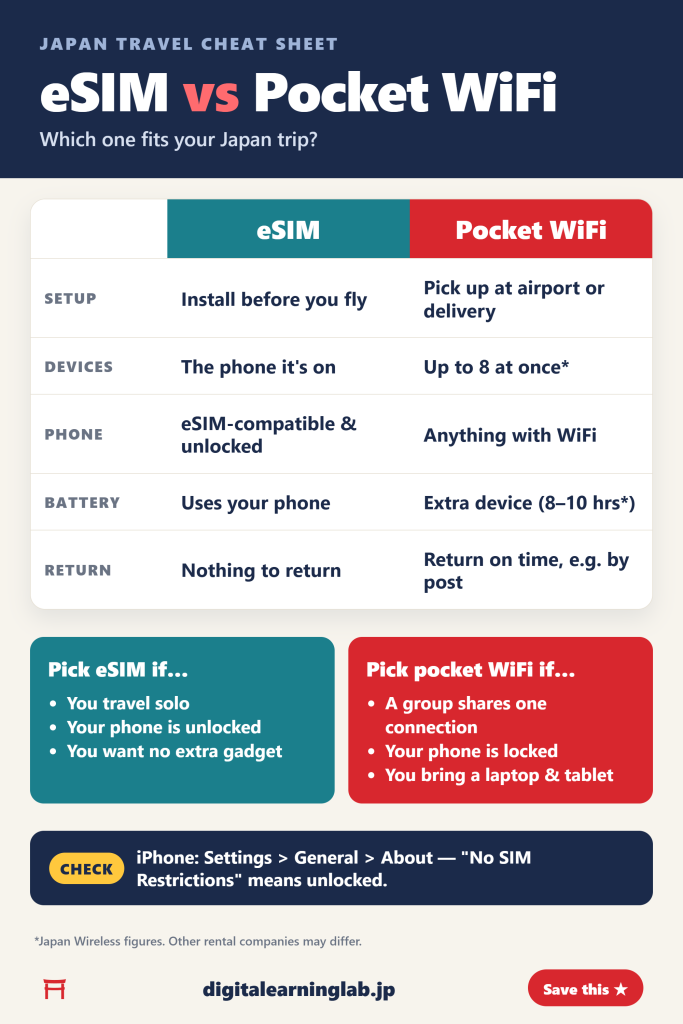
In a hurry? eSIM vs pocket WiFi in one glance:
- Choose an eSIM if you’re traveling solo or everyone has their own compatible, unlocked phone.
- Choose pocket WiFi if you want one connection for several phones, tablets and laptops.
- Check first: an eSIM only works on a phone that supports eSIM and isn’t locked to a carrier.
- Don’t forget: a pocket WiFi has to be collected or delivered, kept charged and returned.
Staying online in Japan makes everything easier — maps, train routes, translation and restaurant bookings. Two popular options are an eSIM on your own phone and a rented pocket WiFi router you carry around. Neither option is better for everyone. This guide compares the two side by side so you can pick the one that fits your trip.
What is the difference?
An eSIM is a digital SIM. You buy a data plan online, install it on your phone before you fly, and your phone connects to a Japanese mobile network when you arrive. There’s nothing to collect or give back.
A pocket WiFi is a small rented router. You pick it up at the airport or have it delivered, turn it on, and connect your devices to it over WiFi. When your trip ends, you return it.
eSIM vs pocket WiFi: side-by-side comparison
| eSIM | Pocket WiFi | |
|---|---|---|
| Setup | Install on your phone before you fly | Pick up at the airport or have it delivered |
| Devices | The phone it’s installed on | Several devices at once (up to 8 with Japan Wireless) |
| Phone requirement | eSIM-compatible and not carrier-locked | Any device that connects to WiFi |
| Battery | Uses your phone’s battery | Separate device to charge (8–10 hours with Japan Wireless) |
| Return | Nothing to return | Return by the deadline (for example, by post) |
| Best for | Solo travelers and couples with compatible, unlocked phones | Families and groups, or travelers with a laptop and tablet |
When an eSIM is the better choice
You want to set everything up before you fly. You set up the eSIM at home, so there’s nothing to collect when you land. Some plans only activate when you arrive — Ubigi’s “Smartstart” feature, for example, starts your plan when you reach your destination.
You don’t want to carry or charge another gadget. Your data lives on your phone, so there’s no second device to keep in your bag, remember to charge, or worry about losing.
You want to keep your home number. According to Apple, supported iPhone models can have two eSIMs active at the same time — one for your home number and one for the country you’re visiting.
You don’t want to think about returns on your last day. With an eSIM, there’s no return deadline and no envelope to post.
Plans are priced by data and days. As an example, Ubigi’s Japan plans on its official site include 10 GB for 7 days at US$14, 10 GB for 30 days at US$16.50, and unlimited data for 15 days at US$39 (30 GB at full speed, then 2 Mbps). Ubigi uses the KDDI and NTT Docomo networks in Japan. Prices can change, so check the current plans before you buy.
When pocket WiFi is the better choice
You’re sharing with family or friends. One router can connect several devices. Japan Wireless, for example, says its router connects up to 8 devices — handy when you’re traveling as a group.
Your phone doesn’t support eSIM, or it’s locked. Because a pocket WiFi connects your devices over WiFi, your phone doesn’t need to support eSIM or be unlocked.
You’re bringing a laptop or tablet. Your phone, laptop and tablet can all connect to the same router at once.
The trade-offs are practical ones. You have to pick up the router or have it delivered, keep it charged during long days out, and return it on time. Japan Wireless lists a battery life of 8–10 hours and includes a free power bank. For returns, it provides a prepaid envelope you can drop in any postbox in Japan by 3:00 PM the day after your rental ends.
Picking up a pocket WiFi at the airport
If you choose to pick up at the airport, here is what the official airport websites say:
- Narita Airport: rental counters are in Terminals 1, 2 and 3, and many are open from 7:00 to 21:00. Counters are only in areas before departure passport control.
- Haneda Airport Terminal 3: there are rental counters in the 2nd floor arrival lobby, and a 24-hour unmanned WiFi rental service is available in front of one of the stores.
If you land late at night, check your rental company’s pickup options and hours before you fly. Our Narita and Haneda to Tokyo guide covers the next step: getting into the city.
How to check if your phone works with an eSIM
Before you choose an eSIM, check two things:
- Your phone supports eSIM. On iPhone, Apple lists the iPhone XS, iPhone XS Max, iPhone XR and later models.
- Your phone isn’t locked to a carrier. On iPhone, go to Settings > General > About. If you see “No SIM Restrictions” next to Carrier Lock, your phone is unlocked.
If either check fails, a pocket WiFi is the easier option. If both pass, our step-by-step eSIM setup guide walks you through installation.
Quick decision guide
- Solo traveler with a compatible phone: eSIM.
- Couple, both with compatible phones: an eSIM each keeps you connected even when you split up for the day.
- Family or group sharing one connection: pocket WiFi.
- Locked or older phone: pocket WiFi.
- Traveling with a laptop and tablet: pocket WiFi.
Still deciding which eSIM to buy? Our best eSIM for Japan comparison looks at Airalo, Ubigi and Klook in detail. And whichever you choose, a power bank for Japan travel helps keep your phone going on long days of maps and photos.
Frequently asked questions
Is an eSIM or pocket WiFi better for Japan?
It depends on who is traveling. An eSIM suits solo travelers and anyone with their own compatible, unlocked phone. A pocket WiFi suits groups sharing one connection and travelers whose phones can’t use an eSIM.
Can I keep my home phone number with an eSIM?
On supported iPhone models, yes. Apple says you can have two eSIMs active at the same time, such as one for your home number and one for the country you’re visiting.
How many devices can connect to a pocket WiFi?
It depends on the rental company. Japan Wireless says its router connects up to 8 devices.
Where do I return a pocket WiFi?
Each company has its own rules. Japan Wireless provides a prepaid return envelope that you can drop in any postbox in Japan by 3:00 PM the day after your rental period ends.
When does an eSIM plan start?
It depends on the provider. With Ubigi’s Smartstart, the plan activates when you arrive in the destination covered by your plan.
Final thoughts
Choosing between the two really comes down to your group and your phone. If you travel light with a compatible, unlocked phone, an eSIM can be set up before you fly, with nothing to pick up or return. If you’re sharing a connection or your phone can’t use an eSIM, a pocket WiFi is the simpler choice. Check your phone today, and you’ll know which way to go.
Sources: Apple Support: Use eSIM while traveling internationally; Ubigi official Japan plan pages; Japan Wireless; Narita International Airport; Haneda Airport Terminal 3. Information checked September 2026.